Adventures with ZFS and Time Machine part 4

This should really be part 5, but part 4 was uneventful enough at the time that I didn’t blog it.

The MacPro upgrade

The main family computer used to be a first generation Mac Pro (model MacPro1,1). This did splendid service for many years, until Mountain Lion (OS X 10.8) came out. The MacPro1,1 was one of a number of models stuck on Lion (OS X 10.7). That was OK, but the machine was also starting to need more expansion than I could afford. Where 5GB had once seemed fine, it was now starting to be a little tight. Alas, the MacPro1,1 uses special FB-DIMM (DDR2) which is eye-wateringly expensive compared to modern RAM pricing. So, eventually, a shiny 27” iMac was purchased and the MacPro became the Time Machine server.

That was effortless, and worked perfectly. Given its internal SATA bays, it was much easier to fill it up with 3 disks (plus a forth for the operating system) which worked a lot faster than the previous FireWire/USB setup

O3X

(Or part 3.5)

The new server worked fine, with only minor annoyances from MacZFS not being actively developed and the odd interaction with AFP and MacZFS.

Then, along came the OpenZFS project, and O3X in particular. I tried out O3X on the iMac (with Mavericks OS X 10.9)  and it worked well. It promised to be faster; to have modern ZFS features; to play nicely with AFP; and it seemed to be stable enough to use for the backups. So, I decided to transition the Time Machine server to O3X.

This has proved to be a little more exciting than I expected.

O3X on Lion

The current (as of writing this blog) version of O3X is 1.2.7. This works on OS X versions up to 10.9—and beyond to the as yet unreleased Yosemite (10.10). However, it requires a 64-bit kernel. The last and only version of O3X that supports a 32-bit kernel is 1.2.0—and that lacks enough features and bug fixes that I’m not happy using it.

While Lion supports a 64-bit kernel (so O3X will happily run under Lion), the MacPro1,1 won’t run a 64-bit kernel. Well, not without some hacking.

Hackintosh

EFI

The MacPro1,1 has a perfectly fine 64-bit processor. However, its EFI firmware that allows it to boot is only 32 bits, so although Lion will fully support  64-bit apps, the kernel itself, along with its low-level drivers, is only 32-bit on 32-bit EFI machines. Since ZFS is a kernel extension, either I need a 32-bit O3X (1.2.0) or a 64-bit OS X kernel.

NVIDIA GeForce 7300 GT

The MacPro1,1 shipped with a number of video card options. The base (and the card I have) is the NVIDIA GeForce 7300 GT.

This card lacks the horsepower to support some of the heavy-lifting that Mountain Lion and after offloaded to the GPU, so is unsupported by 10.8 and beyond, even in an otherwise supported Mac. However it also lacks 64-bit firmware, and thus the ability to fully function in 64-bit mode.

boot.efi

The hacker community has come up with a solution to the EFI problem, in the person of Tiamo and a shim boot.efi that translates between 32 and 64 bit calls. This allows a MacPro1,1 to boot and run Mavericks and even Yosemite

That leaves the problem of the GeForce 7300 GT. Either replace it, or try running using it.

Replacement video card

Although there were a number of cards compatible with the MacPro1,1 available from Apple at one time, they are no longer available except second-hand. There are several modern cards that the community attests work fine, but they tend to be:

  • High-end (and expensive)
  • 64-bit EFI only, so no graphics during boot, until the login screen
  • Reflashed PC cards

Live with the GeForce 7300 GT

Posters to the forums indicate that the GeForce 7300 GT does work, but very slowly, and with a lot of flickering. However, since this mostly runs as a headless server, that may be just fine. I’m not going to be playing games or doing any graphical work on it apart from installing the software.

So, I determined to hackintosh my MacPro1,1 and live with the stock GeForce 7300 GT.

Background

  • The Time Machine server runs purely as a backup server. It contains no original data itself, so that if it is lost, all we’ve lost is the backups. Various family machines back up using Time Machine to the server (into sparsebundle disk images).
  • There are three disks, configured as RAIDZ.
  • A LaunchDaemon job snapshots each day and thins snapshots to the last 7 days and then one per month. This has proved useful to preserve ancient history when Time Machine has decided that a disk is corrupt and wants to start anew.
  • Another job rsyncs the mail from a mail server running OS X Server to ZFS, to a file system, which is snapshotted hourly and thinned to hourly, 7 days then one per month.
  • Finally, BOINC runs in the background to make good use of any spare cycles.

Step 1: backup the backup

Firstly, since I wanted to allow for 4k blocks (the disks are 4k, but the MacZFS pool was not set up with ashift=12) I needed to back up the existing 2TB of data before erasing the current disks and starting them up on O3X.

Since there are no spare disk slots, I needed to back up to an external disk. Fortunately, I have a spare 2TB USB 3.0 drive. Unfortunately, the MacPro1,1 has only USB 2.0.

So, I attached the disk to the iMac (which has USB 3.), and copied the data across over 1Gbps Ethernet.

No so fast

MacZFS doesn’t supports neither zfs send –R, nor piping directly between zfs send and zfs recv, so I had to produce a script that iterated through the file systems and snapshots and copied between systems using a FIFO.

USB strikes again

The transfer being anything but instant (several days worth in fact), the iMac went to sleep, the external USB drive followed suit, and the copy was corrupted beyond ZFS ability to correct.

So, I bought a second 2TB drive, configured it in a ZFS mirror—and also prevented the iMac from sleeping.

gzip and dedup

The amount of data to be backed up was perilously close to the 2TB capacity of the mirror set, so I set compression to gzip and also turned on dedup. As it happened, dedup only saved me a 100GB or so, but that was probably enough to let the copy finish, where it might not otherwise have done so.

It took several days.

Step 2: repartition the proto-Hackintosh

Since I want a fall back position in case the Hackintosh experiment fails, I decided to partition the system disk into two: one with Lion and one with the hacked boot loader and Mavericks.

Disk Utility does this nicely, and non-destructively.

Or not

Disk Utility started the partition, and then stuck at about 50%. A couple of hours later, it’s still stuck. Oops. What happens if I interrupt it I wonder? The more observant among you have realised that Step 3 should have been to backup the system disk and are laughing at my foolishness.

I stop it. I repair the disk. I attempt a reboot.

It works.

Always Have Two Backups

Fortunately, I have spare space on the iMac, and a copy of Carbon Copy Cloner, so I backup everything to there. (Time passes)

Then, since I also have a Mac Mini running OS X Server, I enable Time Machine and backup again, using Time Machine. (Somewhat more time passes).

Repartition

I boot into the Recovery Partition and ask to repartition into two equal disks. Which it won’t do, since it can’t unmount the entire disk. Sigh. Time for the USB key then.

Step 3: Create an Install Drive on a USB key

The instructions from Tiamo on how to do this are somewhat concise. In particular,

3.insert your board-id into OSInstall.mpkg(please google it)

is way more complicated than it seems, since I have to find the Flat Package Editor. I found a video that helps. Suffice it to say that I managed to create OSIinstall.mpkg with the appropriate board-id  board-id for the MacPro1,1 is Mac-F4208DC8, found from the following command

% ioreg -p IODeviceTree -r -n / -d 1

Eventually, I have a bootable USB drive.

Step 4: Repartition (again)

The MacPro1,1 happily boots off the USB key and lets me repartition the disk. After which I have two empty partitions, and no way to boot off the hard drive until I’ve got some sort of O/S back there.

Step 4: Restore Lion from Backup

Time Machine

The Recovery system will happily restore off a Time Machine backup. I point it at the one I just made.

Nope, it finds something wrong with it. Sigh.

I am so very glad I have two backups.

Carbon Copy Cloner

  • I power off the MacPro.
  • I extract the newly partitioned but otherwise empty drive and put it into an external (USB 3) enclosure.
  • I attach it to the iMac
  • I restore using Carbon Copy Cloner.

At this point I discover that I forgot to save the recovery partition when I cloned the drive! Carbon Copy Cloner is happy to create me one, but only using Mavericks since that’s what the iMac runs.

  • Unmount and power off the external drive
  • Remove the disk and replace it in the MacPro1,1, losing one of the four mounting screws in the process. (The last step is purely optional, but somehow seems appropriate. I found the screw on the floor later and replaced it).

Step 5: Boot into the newly restored Lion

Which works, much to my delight. I can at least resume using MacZFS where I left off, if the Hackintosh install fails.

Step 6: Download Lion from the App Store

In order to get a Lion recovery partition, I download it again from the App Store (which is how I upgraded in the first place, so I don’t need to purchase it again). I squirrel it away so I’ll have a copy after it deletes itself (which it does during an install).

Step 7: Re-install Lion

Alarming as this sounds, all it does is create a Lion Recovery partition.

Step 8: Clone Lion to the new partition

More time passes. This is actually slower than copying via USB, since the head is having to shuttle all over the disk.

Step 9: Reboot off the USB Key and install Mavericks

More time passes. Much more time (this process has taken several days so far). The install gets to the migration bit, where the log tells me it is migrating applications. And there it stops.

Step 10: Reboot into Mavericks

Hah! Fooled you there. Regardless of which partition I select, it boots into Lion.

I try reinstalling off the USB key and it refuses to do anything other than boot into Lion.

Step 11: Zap Mavericks partition

I’ll do a clean install and use Migration assistant afterwards.

Step 12: Recreate the USB key

Actually, I do this a couple of times, using various recipes found on the net, trying to find one that works. Eventually I succeed.

Step 13: Install Mavericks

And this time, it works! I resist any inclination to interrupt the process, and it does indeed finish cleanly and reboot. Into Mavericks! Just to be sure, I verify that it will also boot into Lion.

Step 14: Migration Assistant

Mavericks boots and asks me if I want to migrate data. Which I do and it does. It takes its time, but it works just fine. During this, the GeForce 7300 GT seems to perform just fine.

Step 15: Mavericks

And at last, I have a Hackintosh MacPro1,1 running OS X 10.9.4.

I update assorted apps, remove MacZFS and install O3X.

I’m using Screen Sharing and it is really slow. The mouse is quite decoupled at times which makes opening windows challenging. However, ssh and Terminal sessions are fine. System Profiler reports that the graphics card has 3MB of memory (Lion reports 256MB).

Step 16: OS X Server

Since I purchased OS X Server, I install it on the Hackintosh. Without event, and now I have a snappy GUI, at least for Server functionality.

Step 17: O3X

More leaps of faith. I don’t upgrade my pool, but rather reformat using O3X and then restore from the backs USB external drive mirror set.

Alas, the MacPro1,1 only has USB 2.0, so the restore takes a long time. However, at least I can use pipe and a single command per filesystem!

# zfs send –R Backup/Snapshot | zfs receive Target/Filesystem

And it works.


Ongoing

Slow Screen

I stopped using Screen Sharing, and everything sped up tremendously.

It seems that the GeForce 7300 GT doesn’t play well with Screen Sharing under Mavericks.

It does mean that need a screen and keyboard to boot.

Turn off Spotlight

A couple of times I found things locked, including Terminal, after a zpool or zfs command. A reboot was necessary to clear it. Then I remembered the instructions to turn off Spotlight, so a sudo mdutil -i off pool/fs or several later, and all is working well.

Summary

It seems to be working well. Our mail is being backed up, Time Machine is backing up, and this time it’s running through OS X Server. I am happy.
OS X Server and iOS 7 are surprisingly unfriendly

Actually, that’s iOS versions up to and including iOS 7.1, and OS X Server 3 (3.03 to be precise). I.e. Mavericks.

I have a home server, just for the family. It’s got the family mail accounts, which over the years adds up to many GB of mail. There are also iCloud accounts (and various others), but for all sorts of reasons I’m quite happy to have this email on our home server (backed up regularly and frequently by the way).

I also have a personal domain—this one as it happens, although the web host is not on the home server, it’s an external service provider that specialises in web hosting. Of course I also have another set of email addresses with them.

This all works splendidly when we are at home, but we’d also like to be able to access the home server on the go, from a laptop or a smart phone. And that’s where I run into some troubles.

I have a company provided iPhone, which is a delight to use. I can access my work email, and also my iCloud email. The obvious next step would be to add my home email (on the home server) and my email through my hosting provider.

This doesn’t work.

iOS is very particular in two respects about email.

  1. It doesn’t like using untrusted SSL certificates (and the profile installed by my company locks down this requirement)
  2. It has a restricted list of CA root certificate providers that it trusts.

OS X Server then weighs in with its own preferences, in that it really wants you to use SSL, and will refuse to allow a plaintext login (password) unless you use SSL.

These are all very worthy restrictions, but they add up to inconvenience and expense.

No iOS email access to my hosted email

I can’t access my email from iOS at my hosting provider, because they use a generic SSL certificate (hostingdirect.co.nz) rather than my domain. They say on their instructions for setting up mail access:

Please note that it is currently not possible to configure custom SSL certificates for secure email connections.

Please ignore any certificate warnings you receive.

Your connection will still be encrypted to prevent eavesdropping if using SSL and STARTTLS.

No iOS email access to my home email

I can’t use plaintext authentication, even over a fully encrypted IPSEC tunnel (i.e. OS X Server VPN) because OS X Server won’t let me, and I can’t use a self-signed SSL certificate because it’s not in the trusted list. I can’t even add the certificate to the trusted list via a profile because the company imposed restrictions don’t trust my additions.

In fact, to keep iOS happy, I’m pretty much restricted to the list of Apple blessed CA Root providers. And they want quite a lot of money, per year.

If you go to the cheap SSL providers, you’ll find that not only is CACert.org not in the (current) iOS list, neither are some of the other budget providers. The magic phrase to look for is mobile support.

Note that this means I can’t even access the home server, at home, over WiFi, from iOS, without paying fees to an organisation that assumes I’m doing e-commerce and charges accordingly.

Help!

If anyone knows a solution to this, I’d love to know, but thus far the interwebs have not been encouraging. Bearing in mind that this is a company phone, with pretty reasonable restrictions

allowUntrusted-TLSPrompt

Boolean


Optional

When false, automatically rejects untrusted HTTPS certificates without prompting the user.
Availability: Available in iOS 5.0 and later.

All I want is for OS X Server and iOS to figure out that they are ‘locally’ connected (e.g. LAN or VPN) and talk accordingly.

rubycocoa + rvm + Mavericks = fail

I am very happy with OS X Mavericks, by and large. It’s slightly more refined than Mountain Lion, and noticeably faster.

I also noted with pleasure that it installed Ruby 2.0 by default, instead of maintaining the out of date Ruby 1.8.

However, yesterday I tried running a script that invokes a module which i wrote that uses rubycocoa. It doesn’t work. A little digging reveals that rubycocoa is not (yet?) supported on either ruby 1.9 or 2.0. While there is a Mavericks update for rubycocoa, it just makes it work with versions 1.8. While I could live with that, since rvm does a good job of managing this sort of thing, in the case of rubycocoa, rvm has come up short. If I explicitly invoke the script with

#!/System/Library/Frameworks/Ruby.framework/Versions/1.8/usr/bin/ruby

It works, but

rvm use 1.8

#!/usr/bin/env ruby

fails with

/System/Library/Frameworks/Ruby.framework/Versions/2.0/usr/lib/ruby/2.0.0/rubygems/core_ext/kernel_require.rb:45:in `require’: cannot load such file — osx/cocoa (LoadError)
    from /System/Library/Frameworks/Ruby.framework/Versions/2.0/usr/lib/ruby/2.0.0/rubygems/core_ext/kernel_require.rb:45:in `require’


Sigh.

Goodbye Frederik Pohl

I’m sorry to hear that Fred Pohl died.

I had only just read his latest blog entry, and then, the next day, I heard the news.

As I wrote earlier, Fred was to a large extent my gateway into science fiction. All I had to say then, stands, except than in the interim, he managed to win one more Hugo to add to his list—for Best Fan Writer in 2010, for his blog. Wow!

You will be missed.

Posted in SF

Terry Pratchett + Steeleye Span

The most excellent Peter Knight reports that Steeleye Span are working on a new album: a collaboration with Terry Pratchett based on Wintersmith,

I am taking a quick break from my studio where I am working on another composition for Steeleye’s new album, which will hopefully be released in time for the winter tour.

I am sure that most of you know by now that we are working on a collaboration with Terry Pratchett, a recording based on his novel ‘Wintersmith’.

We included four songs from the album on our recent tour and they were very well received, so it is all looking good.

Peter is no stranger to this, having produced (with Bob Johnson) an adaptation of Lord Dunsany’s The King of Elfland’s Daughter in 1977.

I wait with anticipation.

Nethack Ascension

Goodbye michaeln the Demigoddess…

You went to your reward with 4763818 points,
The Eye of the Aethiopica (worth 4000 zorkmids and 10000 points)
Magicbane (worth 3500 zorkmids and 8750 points)
Werebane (worth 1500 zorkmids and 3750 points)
       9 jet stones (worth 7650 zorkmids),
       8 rubies (worth 28000 zorkmids),
       8 amber stones (worth 8000 zorkmids),
       8 amethyst stones (worth 4800 zorkmids),
       7 jacinth stones (worth 22750 zorkmids),
       7 emeralds (worth 17500 zorkmids),
       6 aquamarine stones (worth 9000 zorkmids),
       6 obsidian stones (worth 1200 zorkmids),
       5 diamonds (worth 20000 zorkmids),
       4 sapphires (worth 12000 zorkmids),
       4 turquoise stones (worth 8000 zorkmids),
       4 chrysoberyl stones (worth 2800 zorkmids),
       3 dilithium crystals (worth 13500 zorkmids),
       3 topaz stones (worth 2700 zorkmids),
       3 opals (worth 2400 zorkmids),
       2 black opals (worth 5000 zorkmids),
       2 citrine stones (worth 3000 zorkmids),
       2 garnet stones (worth 1400 zorkmids),
       2 jasper stones (worth 1000 zorkmids),
       1 agate stone (worth 200 zorkmids),
       4 amulets of ESP (worth 600 zorkmids),
       3 amulets of reflection (worth 450 zorkmids),
       2 amulets of life saving (worth 300 zorkmids),
       2 amulets of change (worth 300 zorkmids),
       1 amulet of strangulation (worth 150 zorkmids),
       1 amulet of restful sleep (worth 150 zorkmids),
       1 amulet versus poison (worth 150 zorkmids),
       1 amulet of unchanging (worth 150 zorkmids),
and 4338 pieces of gold, after 78168 moves.
You were level 24 with a maximum of 168 hit points when you ascended.

At last! That was fun, and satisfying. I had Ogresmasher and Trollbane as well, but the weight wasn’t worth it, so they, along with 70kzm, were left behind in my last stash.

Inventory

Amulets
f – an uncursed amulet of life saving (being worn)
h – the blessed Eye of the Aethiopica
Weapons
q – the rustproof +2 Magicbane (weapon in hand)
Armor
b – a blessed fireproof +5 cloak of magic resistance (being worn)
r – a blessed +5 T-shirt (being worn)
u – a blessed rustproof +3 pair of gauntlets of power (being worn)
v – a blessed rustproof +5 helm of brilliance (being worn)
z – a blessed +4 silver dragon scale mail (being worn)
J – a blessed fireproof +4 pair of speed boots (being worn)
Comestibles
o – an uncursed lizard corpse
Potions
G – a blessed potion of full healing
Rings
d – an uncursed +5 ring of protection
O – an uncursed ring of levitation
P – an uncursed ring of conflict (on left hand)
R – an uncursed ring of slow digestion
W – an uncursed ring of free action (on right hand)
X – an uncursed ring of searching
Wands
x – a wand of cold (0:1)
B – a wand of magic missile (0:3)
D – a wand of teleportation (1:3)
E – a wand of lightning (0:5)
S – a wand of death (1:4)
Tools
c – an uncursed stethoscope
k – an uncursed rusty skeleton key
C – an uncursed sack named sack with WAND OF CANCELLATION
I – a blessed fireproof bag of holding
U – a blessed +0 unicorn horn
Y – an uncursed towel
Gems
s – a blessed luckstone
Contents of the sack named sack with WAND OF CANCELLATION:
                                                 a wand of cancellation (0:8)
Contents of the bag of holding:

a blessed wand of polymorph (0:0)
a wand of slow monster (0:0)
a wand of teleportation (0:0)
a wand of magic missile (0:4)
a wand of magic missile (0:1)
a wand of digging (0:3)
an uncursed potion of invisibility
an uncursed potion of full healing
2 uncursed jasper stones
8 uncursed amber stones
9 uncursed jet stones
2 uncursed black opals
4 uncursed chrysoberyl stones
7 uncursed emeralds
6 uncursed aquamarine stones
3 uncursed opals
6 uncursed obsidian stones
an uncursed touchstone
3 uncursed dilithium crystals
3 uncursed topaz stones
4 uncursed sapphires
2 uncursed garnet stones
8 uncursed rubies
8 uncursed amethyst stones
7 uncursed jacinth stones
2 uncursed citrine stones
5 uncursed diamonds
4 uncursed turquoise stones
an uncursed agate stone
an uncursed amulet of ESP
an uncursed amulet of reflection
an uncursed amulet of restful sleep
an uncursed amulet of ESP
an uncursed amulet of change
an uncursed amulet of strangulation
an uncursed amulet of reflection
an uncursed amulet of unchanging
an uncursed amulet versus poison
an uncursed amulet of change
an uncursed amulet of ESP
an uncursed amulet of reflection
a blessed scroll of genocide
13 potions of holy water
a blessed scroll of blank paper
an uncursed scroll of stinking cloud
a blessed scroll of earth
12 +5 daggers
the blessed +6 Werebane
a blessed wand of locking (0:3)
a wand of secret door detection (0:8)
a blessed potion of healing
a wand of create monster (0:15)
an uncursed scroll of magic mapping
a wand of speed monster (0:7)
an uncursed amulet of ESP
a wand of lightning (0:4)
a wand of locking (0:4)
a wand of cold (0:5)
a wand of magic missile (0:5)
a wand of cold (0:5)
an uncursed potion of object detection
4338 gold pieces
a +0 pick-axe
an uncursed potion of enlightenment
an uncursed lembas wafer
a blessed scroll of remove curse
a wand of cold (0:4)
a wand of magic missile (0:4)
a wand of fire (0:6)
a wand of magic missile (0:5)
a wand of magic missile (0:2)
a wand of digging (0:6)
2 blessed potions of object detection
4 uncursed potions of healing
5 uncursed potions of extra healing
7 blessed potions of full healing
a +0 unicorn horn
2 uncursed candy bars
7 uncursed K-rations
11 uncursed C-rations
a +0 unicorn horn
a +0 unicorn horn
a +0 unicorn horn
a wand of magic missile (0:7)
a crystal ball (0:5)
an uncursed amulet of life saving
a wand of death (0:7)
a wand of digging (0:6)
a wand of fire (0:4)
a blessed wand of magic missile (0:4)
12 uncursed food rations
3 uncursed cram rations
a wand of lightning (0:4)
a +0 unicorn horn
a wand of death (0:7)
3 uncursed carrots
a wand of fire (0:3)
a blessed wand of sleep (0:5)
an uncursed orange
a wand of speed monster (0:7)
a rusty wand of cold (0:6)
a wand of secret door detection (0:15)
11 uncursed lumps of royal jelly

Final Attributes:

                                                                        You were piously aligned.
                                                                        You were fire resistant.
                                   ---------                            You were cold resistant.
                                   |...[...|                            You were sleep resistant.
            -----                  |.......|                  -----     You were disintegration-resistant.
             ...|                  |..._...|                  |..4      You were shock resistant.
     ---------..--   ---------     |..*....|                 --..------ You were poison resistant.
     |.....%.|...-- --...... -- |  |...%...|  |    .....    --...|..... You were magic-protected.
     |.....%.|....---..I..... --|. ----|---- .|   ....... ---....|.A... You were telepathic.
     |..._..%%%....-...I...... ||.............|  ...@...a. %..@A.-...@@ You were warned.
     |......%|....---....I.!..-----...II....---  .........---.544|.@... You had infravision.
     |.......|...-- --...%%. --   -----%-----      ..$).    --...|..... You were stealthy.
     ---------..--    ---|----     -.......-        -%-      --..------ You caused conflict.
             ...|      |...--------.........--------.%.|      |...    5 You had teleport control.
            -----      |.........|....%......|.....%...|      -----     You were protected.
                       -------...--......%..--..)-------                You were very fast.
                             | ...--...+...--....|                      You had reflection.
                             ---...----|----...-                        You had free action.
                               |......%........|                        Your life would have been saved.
                               -----------------                        You were extremely lucky.
Michaeln the Necromancer  St:25 Dx:17 Co:16 In:25 Wi:23 Ch:16  Chaotic  You had extra luck.
Astral Plane $:0  HP:146(168) Pw:42(338) AC:-35 Xp:24/40066132 T:78168  Good luck did not time out for you.
                                                                        You survived.

Vanquished creatures:

Demogorgon
Asmodeus
Baalzebub
Orcus
Yeenoghu
Juiblex
The Wizard of Yendor (7 times)
Pestilence (twice)
Famine (4 times)
2 arch-liches
a high priest
8 mastodons
Medusa
6 krakens
13 iron golems
5 master liches
2 storm giants
a titan
a glass golem
2 balrogs
16 purple worms
3 gray dragons
2 silver dragons
11 red dragons
3 white dragons
an orange dragon
14 black dragons
10 blue dragons
5 green dragons
6 yellow dragons
17 minotaurs
6 jabberwocks
The Dark One
8 baluchitheria
8 Angels
6 demiliches
Vlad the Impaler
7 stone golems
9 master mind flayers
25 Olog-hai
6 Nazguls
11 pit fiends
2 sandestins
11 hell hounds
10 titanotheres
7 trappers
a baby white dragon
a baby blue dragon
2 guardian nagas
11 disenchanters
30 vampire lords
5 skeletons
23 aligned priests
5 captains
6 shades
11 liches
3 clay golems
12 nurses
14 ice devils
5 nalfeshnees
11 lurkers above
an Aleax
a frost giant
15 ettins
3 golden nagas
6 black puddings
35 vampires
7 lieutenants
42 ghosts
3 queen bees
15 winged gargoyles
3 mind flayers
11 giant mimics
16 zruties
15 fire giants
6 ogre kings
an ice troll
25 rock trolls
16 umber hulks
4 flesh golems
5 Elvenkings
3 doppelgangers
23 hezrous
11 bone devils
15 large mimics
5 wumpuses
14 fire vortices
a baby long worm
2 baby purple worms
12 long worms
4 couatls
16 stalkers
6 air elementals
17 fire elementals
10 earth elementals
8 water elementals
a hill giant
4 giant mummies
2 black nagas
26 xorns
20 giant zombies
6 elf-lords
25 sergeants
9 barbed devils
18 vrocks
10 salamanders
29 wargs
2 winter wolves
7 hell hound pups
24 small mimics
8 glass piercers
8 warhorses
14 steam vortices
25 xans
9 ettin mummies
5 ogre lords
12 quantum mechanics
41 trolls
2 sasquatches
8 wood golems
3 erinyes
7 mariliths
4 sharks
7 electric eels
4 gelatinous cubes
11 pyrolisks
8 large dogs
4 freezing spheres
8 flaming spheres
10 shocking spheres
7 large cats
6 tigers
11 gargoyles
4 dwarf kings
11 tengu
27 ochre jellies
25 leocrottas
8 energy vortices
3 mountain centaurs
6 stone giants
8 elf mummies
6 human mummies
a red naga
7 green slimes
11 pit vipers
4 pythons
23 cobras
54 wraiths
12 carnivorous apes
15 ettin zombies
9 leather golems
2 Grey-elves
47 soldiers
14 horned devils
10 succubi
5 incubi
6 chameleons
5 crocodiles
20 giant beetles
10 quivering blobs
31 cockatrices
18 wolves
7 winter wolf cubs
7 lynxes
7 panthers
13 gremlins
12 spotted jellies
31 leprechauns
7 orc-captains
8 iron piercers
10 mumakil
19 giant spiders
12 scorpions
5 horses
an ice vortex
14 black lights
44 vampire bats
4 forest centaurs
6 gnome kings
7 orc mummies
6 dwarf mummies
5 ogres
7 brown puddings
18 rust monsters
18 owlbears
9 yetis
6 gold golems
4 werewolves
3 Green-elves
2 piranhas
13 giant eels
21 lizards
10 chickatrices
6 dogs
2 dingos
4 housecats
11 jaguars
5 dwarf lords
9 blue jellies
7 white unicorns
8 gray unicorns
12 dust vortices
34 ravens
9 plains centaurs
3 gnome mummies
17 snakes
5 apes
26 human zombies
5 rope golems
2 Woodland-elves
20 soldier ants
23 fire ants
2 bugbears
5 imps
10 lemures
6 quasits
4 wood nymphs
6 water nymphs
8 mountain nymphs
40 Mordor orcs
an Uruk-hai
3 orc shamans
14 rock piercers
2 rock moles
9 ponies
7 fog clouds
21 yellow lights
2 shriekers
2 violet fungi
20 gnome lords
11 gnomish wizards
6 kobold mummies
2 black naga hatchlings
a guardian naga hatchling
14 gray oozes
7 barrow wights
16 elf zombies
18 ghouls
7 straw golems
9 paper golems
5 jellyfish
2 baby crocodiles
82 giant ants
3 little dogs
7 floating eyes
2 kittens
25 dwarves
7 homunculi
6 kobold lords
2 kobold shamans
18 hill orcs
33 rothes
3 rabid rats
5 centipedes
24 giant bats
3 monkeys
14 orc zombies
21 dwarf zombies
5 wererats
4 werejackals
12 iguanas
111 killer bees
6 acid blobs
2 gas spores
6 hobbits
32 manes
5 large kobolds
5 hobgoblins
17 giant rats
4 cave spiders
4 brown molds
10 yellow molds
a green mold
2 red molds
52 gnomes
13 garter snakes
15 gnome zombies
9 geckos
23 jackals
6 foxes
4 kobolds
7 goblins
10 sewer rats
25 grid bugs
8 bats
14 lichens
8 kobold zombies
14 newts

3084 creatures vanquished.

Posted in d20

Things I’d like to see from Apple, part 5

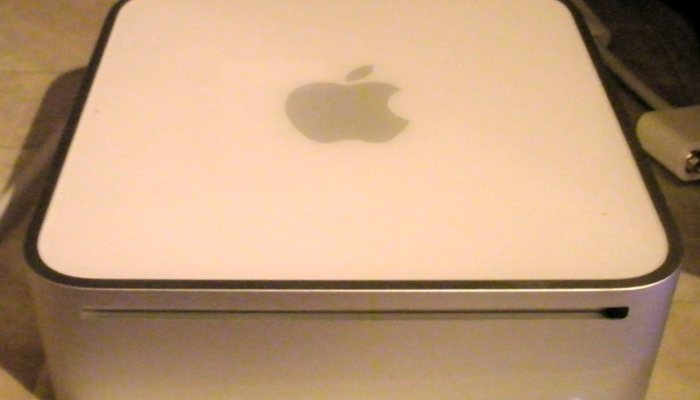
My first musings on what I’d like to see from Apple were basically a home server edition of Mac OS X Server, and suitable hardware, which, as I said was “pretty much a Mac Mini, with the exception of the 802.11n.”.

That was in 2008. Since then, the Mac Mini has moved on, with the addition of 802.11n, plus Thunderbolt and USB 3.0.

Mac OS X Server has also moved on, and in many way what Apple is now delivering is a home server, with, if not a Squid cache, at least App store caching, mail server, Time Machine, etc.. There are excellent reviews of Mac OS X Server (Mountain Lion) at Ars Technica (updated in Jan 2013 when new features were released).

Significantly, the price has plummeted to to being eminently affordable. It’s basically US$20.00—the same price as Mountain Lion itself.

That being the case, I’ve installed it as the home server, and I’m happy with it in that mode. I’ve repurposed my Mac Mini that was running as the Time Machine server (that function has gone to another machine) and it happily acts as the family mail server together with some other functions such as providing a VPN (so we can check our mail on the road).

Mac OS X Server is now basically just Server.app, with all the server components hidden away inside the App bundle. It is also very encouraging to see Apple adding new functionality, like the Caching server which appeared as a new feature in the first Server update.

That leads to a little list of things I’d like to see added (or fixed):

  • Cache Server reporting. At the moment there is no display of what things are in the cache (which I’d like to know for curiosity’s sake).
  • More caching. At the moment, iTunes purchases are not cached, nor is general web browsing.
  • Fetchmail support. I pull mail onto the server for all the family members off multiple ISP accounts. Among other things, this keeps GB—and years—of mail on a local server which is not subject to merger, change of terms of service, bankruptcy or pre-emptive shutdown by foreign powers. It may be antediluvian and I should probably have the mail SMTP direct to my own domain, but in the meanwhile it suits me quite well and I surely can’t be alone in this.
  • The Mail server stops. Well, actually, it doesn’t. Server.app says that it has, but the server is really running quite happily.
  • Documentation. Really, the Apple documentation is inadequate. In transition from an enterprise product to a home product the documentation got left behind. I bought Server because I figured the price was low enough that if it wasn’t useful to me I would not have wasted much. I couldn’t figure out how useful it would be from reading the documentation. In the end, the web provided more useful how to and advice than the Apple documentation ever did.

Adventures with ZFS and Time Machine part 3

Well, really just adventures with ZFS this time.

About a year ago I had a disk fail—just a couple of weeks within the 5 year warranty—and when I got the replacement, ZFS dutifully resilvered the RAIDZ set. Then, recently, I had another disk (even older) fail, in another machine. And then I had another (different) disk fail in the RAIDZ disk. I was beginning to wonder what was going on (the computers are on a filtered power supply by the way).Well, to cut a long story short, it was actually the USB enclosure that failed (as far as I can tell). This led be to become acquainted with just how slow USB is.

Everyone says not to use USB for ZFS, mostly because a number of USB controllers lie about write integrity, which can cause even ZFS’s bullet-proof write system to fail. However, there are other reasons to be concerned about USB, namely performance, especially with scrub.

Given this, why use USB? Well, price and availability. A few years ago, USB + FireWire enclosures were reasonably common. Now, USB is just about all that is available unless you go to high end RAID—and I’m trying to let ZFS do the job here, rather than buy a RAID controller, so I would end up paying a lot more for something I don’t need. Of course, if I had a tower case with lots of drive bays I could just plug them in there, but I don’t. At the moment the ZFS machine is a Mac Mini, a splendid little machine, but one with FW800 and USB 2.0 only, and with its form-factor, no space for extra internal drives.

USB speed

So, after that diversion, back to my ‘discoveries’ about USB. USB 2.0 is nominally 480Mbps. Except that this is nowhere near the actual rate. The web informs me that normal USB 2.0 disk performance is 20-25MBps (160-220Mbps), or around 40% of the theoretical speed of USB 2.0. I knew that USB was slower than FireWire, but I had not realised quite how slow.

In fact, my measured speed on my current disks seems to be about 20MBps sustained. Note that this is only about 10% of the speed of even a consumer SATA disk. That has serious consequences for a number of operations

Disk Formatting

It’s quite a good idea to write zeros to every block of even a new disk. This causes the disk firmware to check every sector (and allocate spare sectors if necessary). This is also a way to check an older disk. With current disk sizes of 1, 2 and 3TB, this is going to take a long time using USB.

Time to format (hours)
1TB 2TB 3TB
USB 2.0 14.5 29 44
SATA 1.5 3 4.4

That’s also the amount of time it’s going to take to copy that much information to or from the disk.

Scrubbing/Resilvering

From the above, it’s obvious that a resilver is also going to take a very long time, although assuming that the ZFS pool is not full, it will take proportionally less time. A RAIDZ that is 75% full will take 22 hours to replace a 2TB drive.

That leads us to scrub. Normal ZFS best practice is to zpool scrub once a week for consumer grade drives, which should catch any errors while there is still time to do something about it. What scrub does is read every in-use block, on every disk in the pool, and compare it to a calculated checksum. If there is a mismatch zpool reports the error and tries to rewrite the block (which has a good chance of fixing the problem if the disk firmware remaps an ailing sector). That means, for a RAIDZ pool, a scrub will take (capacity used)/(disks in pool)/(sustained read speed). For USB 2.0, that means a long time. By comparison, SATA attached disks will be done in 1/10 the time.

There is an extra gotcha. If you are using MacZFS, there is a bug (fixed in later versions of ZFS) that restarts the scrub/resilver if you do a snapshot on the pool during said scrub/resilver. If, for instance, you take hourly snapshots…your scrub is never going to finish.

That being the case, it is a really good idea to modify any automatic scripts to check to see if a scrub or resilver is in progress and refrain from snapshotting if it is. The following Ruby fragment may prove useful.

Ruby fragment to check if a ZFS filesystem is busy

BIN_DIR = ‘/usr/sbin/’
ZPOOL_CMD = “#{BIN_DIR}zpool”

def busy?(name)
pool = name.match(‘^[^/]+’)[0]
IO.popen(“#{ZPOOL_CMD} status #{pool}”).any? { |l| l[‘scrub in progress’] or l[‘resilver in progress,’]}
end

Hello WordPress

As I mentioned before

At this point, you might wonder why I am using iWeb. So am I.

As you can see, I for one welcome our new WordPress overlords.

It seems easier at this point to simply retain the old iWeb pages with a link to them off the WordPress entries rather than try to move them across. I have duplicated one entry, the d20 Coinage entry, since it was the apparent inability of Google and Bing to find the page that finally prompted me to change.

Coinage in d20 Games

In my D&D campaigns, I got sick of everything being a multiple of 10, when historically coins were multiples of 12, 4, 6 etc. Just consider the British penny; half-penny; farthing (four to the penny); threepence; groat (four pence); sixpence; shilling (equal to twelve pennies); florin (two shillings); half-crown (2 shillings and sixpence); crown; pound (20 shillings) and guinea (21 shillings).

There is also the oft remarked upon fact that in the D&D world, everyday items are greatly inflated in price, with every thing being held to the d20 ‘gold’ standard.

To that end, I created a more varied system. The campaign that uses this is set in Middle-Earth, and for the currency of the North (the ancient realm of Arnor), I created a system with more reasonable values (a standard working wage of a penny a day) and a wide variety of coins, from different races (Human, Elf and Dwarf) and regions.

More…

Posted in d20